Learn how to pass the variable value from asp.net code behind to javascript

In this asp.net tutorial you will learn how to pass the variable value from asp.net code behind to javascript. It is quite easy and handy. You must know how to do so because in certain cases you may have to pass value from asp.net code behind to javascript. Let's have a look over how to do so

How to pass the variable value from asp.net code behind to javascript

<html xmlns="http://www.w3.org/1999/xhtml">
<head runat="server">
<title>How to pass the variable value from asp.net code behind to javascript</title>
<script type="text/javascript">
//Getting variable from asp.net code behind
var myMessage = "<%=myMessageFromCodeBehind %>";
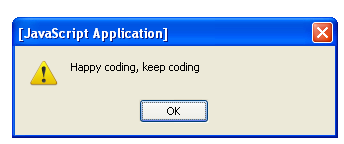
alert(myMessage);
</script>
</head>
<body>
<form id="form1" runat="server">
<div>
</div>
</form>
</body>
</html>
Let's have a look over .cs side
//Declaring protected type string variable 
protected string myMessageFromCodeBehind;

protected void Page_Load(object sender, EventArgs e)
{
//Assigning Value to variable
myMessageFromCodeBehind = "Happy coding, keep coding";
}
I have declared a protected type string variable myMessageFromCodeBehind in asp.net code behind, assign a value to that variable and get it on my .aspx page using javascript given below
var myMessage = "<%=myMessageFromCodeBehind %>";
alert(myMessage);
So this is the proper way to pass the variable value from asp.net code behind to javascript.

Read more...

How to get all store procedures saved in ms sql server database

In this tutorial you will learn how to get all store procedures saved in ms sql server database. Its quite easy and simple. Just you have to do is to write and execute the following query.

How to get all store procedures saved in ms sql server database


SELECT * FROM SYS.OBJECTS WHERE TYPE ='P'
 
This above mentioned query will return you all store procedures placed in your ms sql server database. Sys.Objects is a built-in table in ms sql server that contains information about each and every element of the database.

I love your feedback.
Read more...

learn how to get random records in sql server

In this ms sql server tutorial you will learn how to get random records in sql server. Sometimes you may need to get random records from table in ms sql server database. To do this in ms sql server is quite easy. Let's have a look over example below in which i am getting five random records from visitors table located in ms sql server database.

Get random records in ms sql server

SELECT TOP 5 firstname, lastname, country FROM visitors
ORDER BY NEWID()


The NEWID() system function makes a unique value of the type uniqueidentifier. There is no need to add a new column in your table to get the random records. you just have to include the NEWID() system function in the ORDER BY clause of your SELECT statement. I hope you will like this tutorial.
Read more...

Calculate number of years, months and days between two given dates in asp.net using c#

In this tutorial, you will learn how to calculate number of days, months and years between two given dates in asp.net using c#. Asp.net has built-in class TimeSpan. Using TimeSpan class you can calculate no of days, hours, minutes, seconds and even milliseconds but if you want to calculate total no of months and years between two given dates then TimeSpan class cannot help you. So that's why the focus of this article is to calculate exact number of days, months and years between two given dates using custom class given below. Let's have a look over it.

Calculate number of years, months and days between two given dates in asp.net using c#

Calculate-days-months-years.aspx.cs
protected void Page_Load(object sender, EventArgs e)

{


DateTime dt1 = Convert.ToDateTime("02/01/2011");

DateTime dt2 = Convert.ToDateTime("11/04/2010");

//Initializing object and then calling constructor

CalculateDateDifference dateDiff = new CalculateDateDifference(dt1,dt2);

int totalMonths = dateDiff.Months;

int totalDays = dateDiff.Days;

int totalYears= dateDiff.Years;


}


//Class that will calculate the number of days, months and years between two given dates.


public class CalculateDateDifference

{

/// <summary>

/// defining Number of days in month; index 0 represents january and 11 represents December

/// february contain either 28 or 29 days, so here its value is -1

/// which will be calculate later.

/// </summary>

private int[] monthDay = new int[12] { 31, -1, 31, 30, 31, 30, 31, 31, 30, 31, 30, 31 };


/// <summary>

/// contain from date

/// </summary>

private DateTime fromDate;


/// <summary>

/// contain To Date

/// </summary>

private DateTime toDate;


/// <summary>

/// these three variable of integer type for output representation..

/// </summary>

private int year;

private int month;

private int day;


//Public type Constructor

public CalculateDateDifference(DateTime d1, DateTime d2)

{

int increment;


//To Date must be greater

if (d1 > d2)

{

this.fromDate = d2;

this.toDate = d1;

}

else

{

this.fromDate = d1;

this.toDate = d2;

}


///

/// Day Calculation

///

increment = 0;


if (this.fromDate.Day > this.toDate.Day)

{

increment = this.monthDay[this.fromDate.Month - 1];


}

/// if it is february month

/// if it's to day is less then from day

if (increment == -1)

{

if (DateTime.IsLeapYear(this.fromDate.Year))

{

// leap year february contain 29 days

increment = 29;

}

else

{

increment = 28;

}

}

if (increment != 0)

{

day = (this.toDate.Day + increment) - this.fromDate.Day;

increment = 1;

}

else

{

day = this.toDate.Day - this.fromDate.Day;

}


///

///month calculation

///

if ((this.fromDate.Month + increment) > this.toDate.Month)

{

this.month = (this.toDate.Month + 12) - (this.fromDate.Month + increment);

increment = 1;

}

else

{

this.month = (this.toDate.Month) - (this.fromDate.Month + increment);

increment = 0;

}


///

/// year calculation

///

this.year = this.toDate.Year - (this.fromDate.Year + increment);


}


public override string ToString()

{

//return base.ToString();

return this.year + " Year(s), " + this.month + " month(s), " + this.day + " day(s)";

}


public int Years

{

get

{

return this.year;

}

}


public int Months

{

get

{

return this.month;

}

}


public int Days

{

get

{

return this.day;

}

}


}
Now totalDays variable will have total number of days between these given dates, likewise totalMonthstotalYears variable will have total number of years between two given dates. So this is the way to calculate number of years, months and days between two given dates in asp.net using c#. variable will have total number of months and
I hope it will be a great helpful for you. 
Happy Coding, Keep Coding.
Read more...

Learn how to find number of days in a given month in asp.net using c#

In this tutorial you will learn how to find number of days in a given month in asp.net using c#. It's quite easy. DateTime class has built-in function DaysInMonth(year,month) that takes two parameters, first one is Year, second one is month and then return the number of days in that given month. Let’s have a look over example given below

Find number of days in a given month in asp.net using c#

Number-of-days-in-month.aspx.cs
int totalDays = DateTime.DaysInMonth(2007, 6); //Pass valid year and month

Now totalDays variable will have total number of days in a given month. I hope it will be great helpful for you.


Happy Coding, Keep Coding.
Read more...